You sent the invoice three weeks ago. The project is done, the client was happy, and the payment is just sitting there, unpaid. You know you should follow up, but the email keeps sliding down your to-do list because writing a polite-but-firm payment reminder feels awkward when you are also trying to keep the relationship warm.
So another week passes. Then another. You finally send a message that sounds either too casual or too stiff, and the whole interaction feels harder than it needs to be. Meanwhile, your cash flow is quietly taking the hit.
Why Invoicing Follow-Up Breaks Down
The issue is almost never that your clients refuse to pay. Most late payments come from distracted inboxes, internal approval chains, or invoices that arrived at the wrong moment and got buried. Your clients are running their own operations, dealing with their own interruption fatigue. They are not ignoring you on purpose.
The real problem is on your side. Invoicing follow-up is one of those tasks that feels simple enough to handle manually, so it never gets systematized. You rely on memory, sticky notes, or a vague mental calendar that says “check on that invoice sometime this week.” That works when you have five clients. It falls apart at fifteen.
What makes this especially frustrating is that the follow-up itself is predictable. The timing, the tone, the escalation steps are all things you could write once and reuse for every invoice. You just have not had the time to build the system. Everything runs through you, and this is one more thing on the pile.
How to Build an Automated Follow-Up Sequence
Step 1: Map your current follow-up pattern
Before you automate anything, write down what you actually do now when an invoice goes unpaid. When do you notice? What do you say in your first reminder? How long do you wait before the second? Most business owners realize they have an informal pattern they have been repeating for years. Getting it on paper is half the work. You are not creating something new. You are capturing what already exists in your head.
Step 2: Write four templates in your own voice
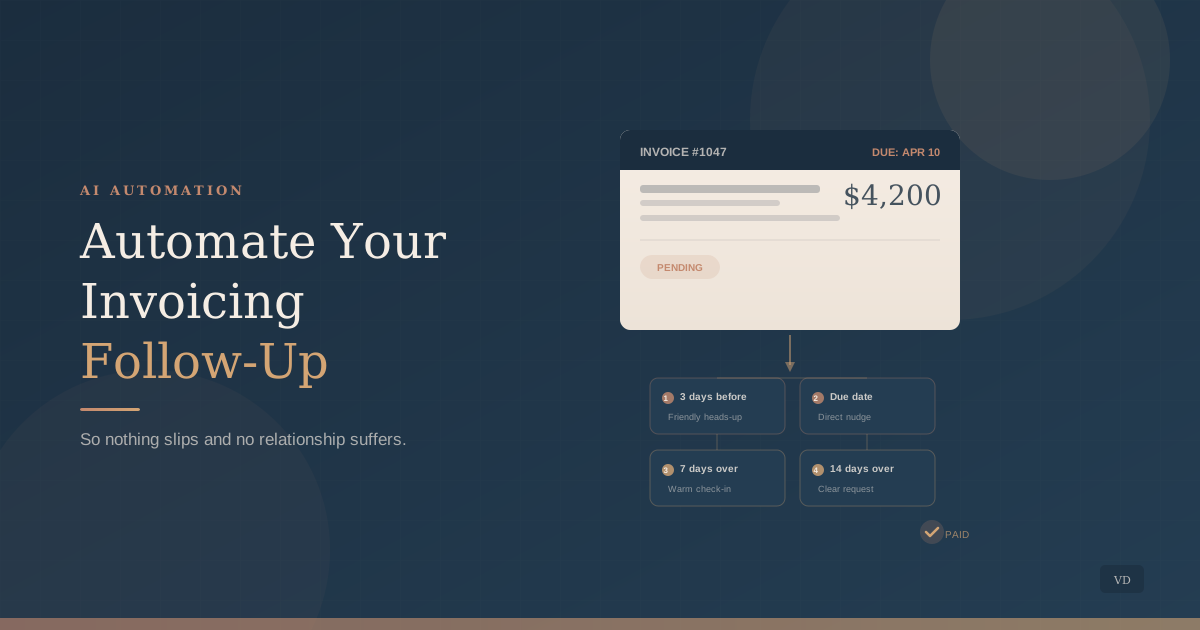
You need four messages that cover the full arc from gentle to firm. Pre-due reminder (3 days before): a brief, friendly heads-up that the invoice is coming due. Due-date nudge: a direct note confirming the invoice is due today with payment details included. 7-day overdue: a warmer check-in asking if there is an issue or if anything was missed. 14-day overdue: a clear, professional message noting the balance and requesting a specific response date. Write these in your own words. If a template sounds like a collections agency, rewrite it until it sounds like you on a calm Tuesday morning.
Step 3: Set up the automation in your invoicing tool
Most invoicing platforms (QuickBooks, FreshBooks, Xero, and many others) have built-in reminder sequences. Configure them to send your four templates at the intervals you mapped in Step 1. If your platform does not support automated reminders, tools like Zapier or Make can connect your invoicing software to your email and trigger messages based on due dates. The key is that every invoice gets the same consistent follow-up without you remembering to do it.
Step 4: Use AI to personalize at scale
Automated does not have to mean generic. Use AI to adjust each template for specific clients or projects before the sequence runs. Feed AI the client name, project description, and invoice amount, and ask it to adapt your base template so the message feels specific rather than mass-produced. This takes thirty seconds per invoice and makes the difference between a reminder that gets read and one that gets ignored.
Copy-paste prompt: Here is my standard 7-day overdue invoice reminder template: [Paste your template here]. Personalize this for a client named [client name] who hired us for [project description]. The invoice amount is [amount]. Keep my voice and tone. Do not add urgency or pressure. Just make it feel like I wrote it specifically for them.
Step 5: Review your system quarterly
Once the automation is running, check in every three months. Look at which reminder in the sequence actually gets invoices paid (usually the first or second). Check whether your tone still matches how you communicate now. Adjust timing if your client base has changed. A follow-up system that runs without review eventually drifts from your voice and your reality.
The best follow-up system sounds exactly like you. Automation handles the timing and consistency. Your voice handles the relationship.
What to Watch For
Automating before your templates are ready. A bad template sent on time is worse than a good email sent late. Write your four messages carefully before you connect any automation. The system is only as good as the words inside it.
Skipping the pre-due-date reminder. This is the most overlooked step and often the most effective. A simple “your invoice is coming due on Friday” prevents more late payments than any overdue notice. It gives your client time to process the payment before it becomes an issue.
Never reviewing the system once it runs. Automation creates a false sense of “it is handled.” But client relationships evolve, your business changes, and the templates that worked six months ago might feel stale or off-tone today. Schedule a quarterly check the same way you would review any other system in your business.
Start This Week
Pick your five most recent invoices and write down what follow-up each one actually received. If the answer is inconsistent, that is your signal. Write your four templates this week, set up the automation next week, and let the system handle the timing so you can focus on the work that actually needs your judgment.
Consistent follow-up is not about being aggressive. It is about being present and professional, without requiring your active attention every time a due date passes.
If you want help building a follow-up system that fits your voice and your invoicing workflow, that is something we do regularly with the businesses we work with.
Book a free discovery call
About the author
Missy Ross
Missy Ross is the Founder and AI Architect of Vero Dawn, an AI architecture and solutions company that helps businesses see what could work better, determine the right solution, and bring it to life. Before founding Vero Dawn she spent 21 years in internal audit across banking and manufacturing, at Audit Director level.